The digital wardrobe app that checks a piece before you buy it.
Wardrobe Wallet keeps your closet on your phone. Before you buy something new, it shows what it goes with in the clothes you already own, and tells you plainly: Worth adding, Wait or Skip.
Get the free betaFree · no code needed · about 2 minutes
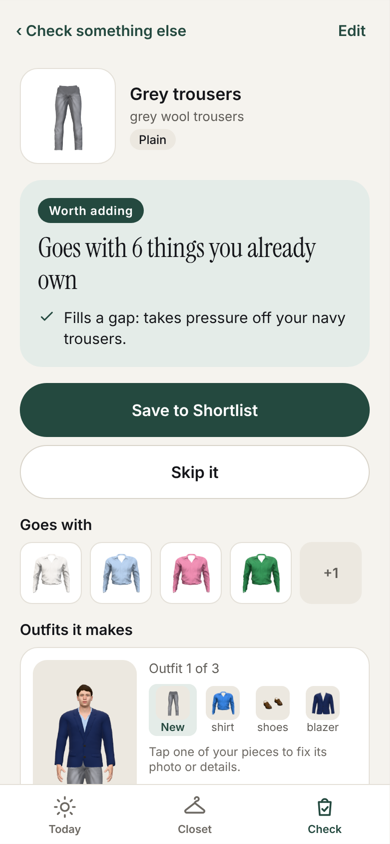
Will it go with what you own? Check before you buy.
Most clothes that never get worn were bought without checking what they go with. Check answers that before you pay.
Show it the piece
Paste a store link, share from a store, snap a photo or type what you saw.
See what it goes with
The pieces in your closet it matches, and the outfits it makes.
Get a straight answer
Worth adding, Wait or Skip, with the reason.
Compare before you decide
Save it to your Shortlist and see a few side by side across stores, with the full price including shipping and returns.
The app never buys for you. Buy opens the store's own page and you pay there.
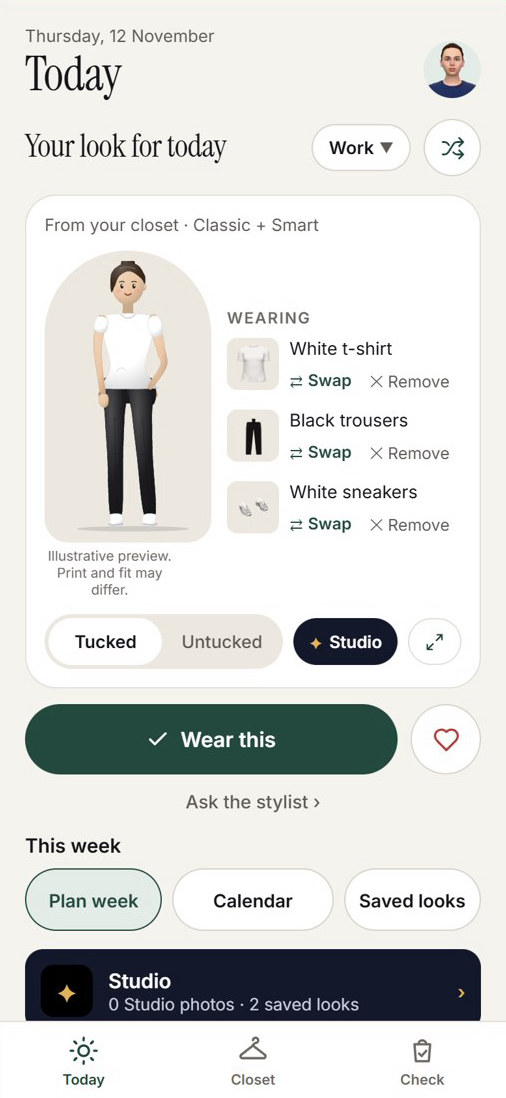
What to wear today, from your own clothes.
Open the app and there is an outfit ready. It works as an outfit planner that only uses what is in your closet.
- Fits the day. Looks follow the weather, what's in the wash and what you like wearing.
- Easy to change. Swap any piece, or pick the occasion: work, a dinner, a weekend.
- Plan ahead. Plan the week, keep a calendar of what you wore, and save the looks you like.
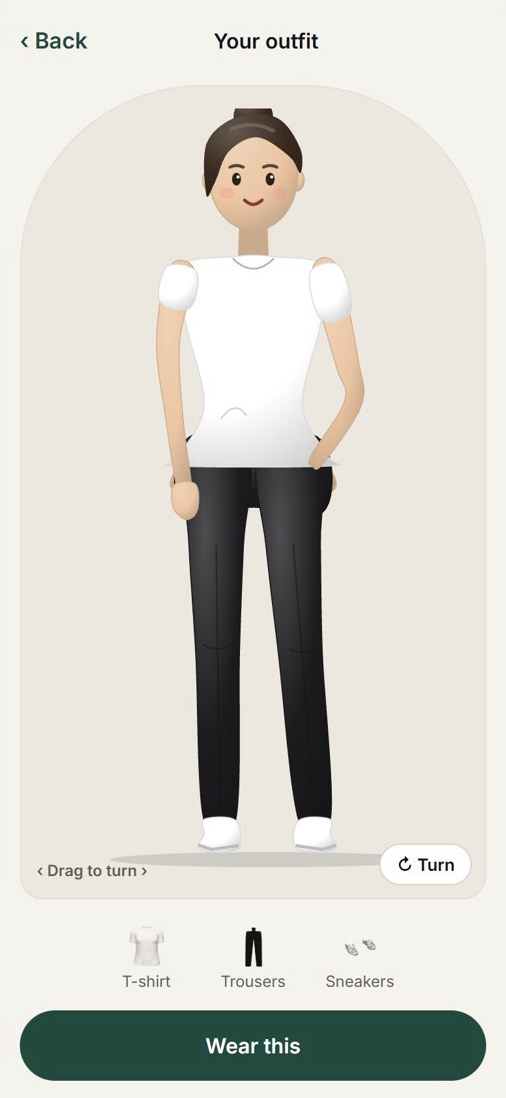
See the outfit on a figure before you wear it.
Every outfit can be seen on a 3D figure you turn around with your finger, which is a quick way to try ideas.
When you want to see it for real, Studio makes a picture of the outfit on you, from your own photos. Studio pictures are free up to a limit.
A digital wardrobe that is quick to fill.
Add a piece with a photo, a store link or by hand. Start with a few pieces and add more as you go.
Sign in with Google or an email and your virtual closet is saved to your account, ready on any phone or tablet.
Closet clean-out, without the guessing.
The app keeps track of what you wear, so it can show you the pieces you never reach for and the gaps a new piece would fill.
Mark pieces as sold or given away and your closet stays true to what you own.
Free on iPhone, iPad and Android.
Wardrobe Wallet is a free beta. On iPhone and iPad it comes through TestFlight, Apple's own app for trying new apps. The install page walks you through it in about two minutes.
Get Wardrobe WalletQuestions
Is Wardrobe Wallet free?
Yes. It is free while we are in testing. Studio pictures are free too, up to a limit, and you can ask for more from inside the app.
Does it work on iPhone and Android?
Yes. Wardrobe Wallet runs on iPhone, iPad and Android. It is a free beta, so on iPhone and iPad it comes through Apple's TestFlight app. The install page walks you through it in about two minutes.
How do I add my clothes?
Take a photo of a piece, paste a link from the store you bought it from, or type it in by hand. You can start with a few pieces and add more later.
How does Check work?
Paste a link, share from a store, snap a photo or type what you saw. The app shows what it goes with in your closet and says Worth adding, Wait or Skip.
Does the app buy things for me?
No. Buy opens the store's own page and you pay there. When you come back, one tap adds it to your closet.
Do I need to sign in?
You can look around without an account. Sign in to save your closet, use it on more than one device, and make Studio pictures.
Who sees my photos?
Only you. No one else using the app can see them. Your original photos stay on your phone, and the pictures in your closet and your Studio pictures are kept privately in your account. When the app reads a photo or makes a Studio picture, a copy is sent to an AI service (Anthropic or Google) and the result comes back to you. Your face photo is sent only if you switch that on.
Do I need to be good with tech?
No. If you can take a photo, you can use it.
Your data stays yours
Only you can read your own closet. We don't sell your data or show ads. Your face photo is used only if you switch that on. You can delete your account and everything in it from inside the app at any time.
Signing in with Google
Google sign-in gives the app your name and email address, nothing else. It never reads your Gmail, Drive, contacts or calendar.